Projects
Summary
Here you can find a list of all my projects. Private / unreleased projects will be preceded by an .
| Project | Time | Status | Description |
|---|---|---|---|
| rotating_buffer.h | 2026 | Finished | A single-header library for C/C++ to create rotating buffer. |
| cpp-tic-tac-toe | 2026 | Finished | This is a small project written in C++ with CMake to learn how to use CMake and to refresh my memory on how to code in C++. |
| voxy-backport | 2026 | On going | This project is a backport of a Minecraft mod to 1.20.1 from 1.21.10+. Not finished yet. (Java) |
| MLG | 2025 | On going (paused) | MLG (MLG Loader for Godot) is a tool that enables users to load custom DLLs and PCK files into games built with Godot. (C#) |
| Drone Sim | 2025 | On going | A drone simulator in Godot for another personal project. The code is a bit dirty and it lack of some features. It will become public when at presentable state. (C#/C++) |
| microbits-cars | 2025 | Finished | Code for the cars made with Micro:bit for the competition Yes-We-Code 2025. I was in collaboration with LIAIGRE Mathéo. (Python) |
| SuS Museum | 2024 | On going (paused) | Game I developing with a friends. Not released wet. Demo will be available on Github - CheeseOnBaguetteGameStudio. (C#) |
| YuzuToolbox | 2024 | Contributor | A GUI for installing and updating yuzu early access, in addition to some management tools and a mod manager. Written in C# with Godot Engine. |
rotating_buffer.h



This is a try to make a rotating buffer in C++, but while working on it, I discovered single header library. I thought that as this project is really small, why not make it a single header library.
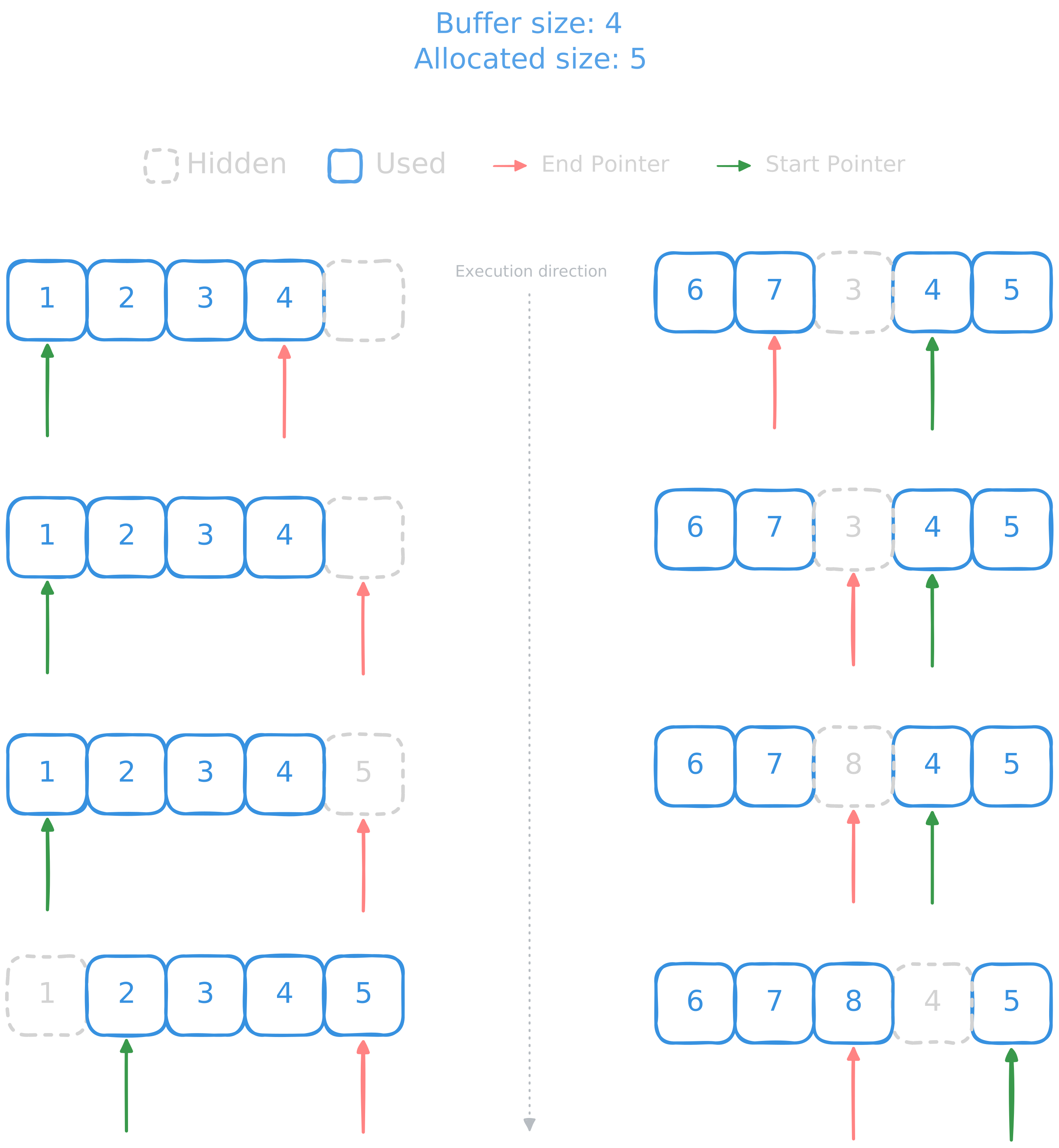
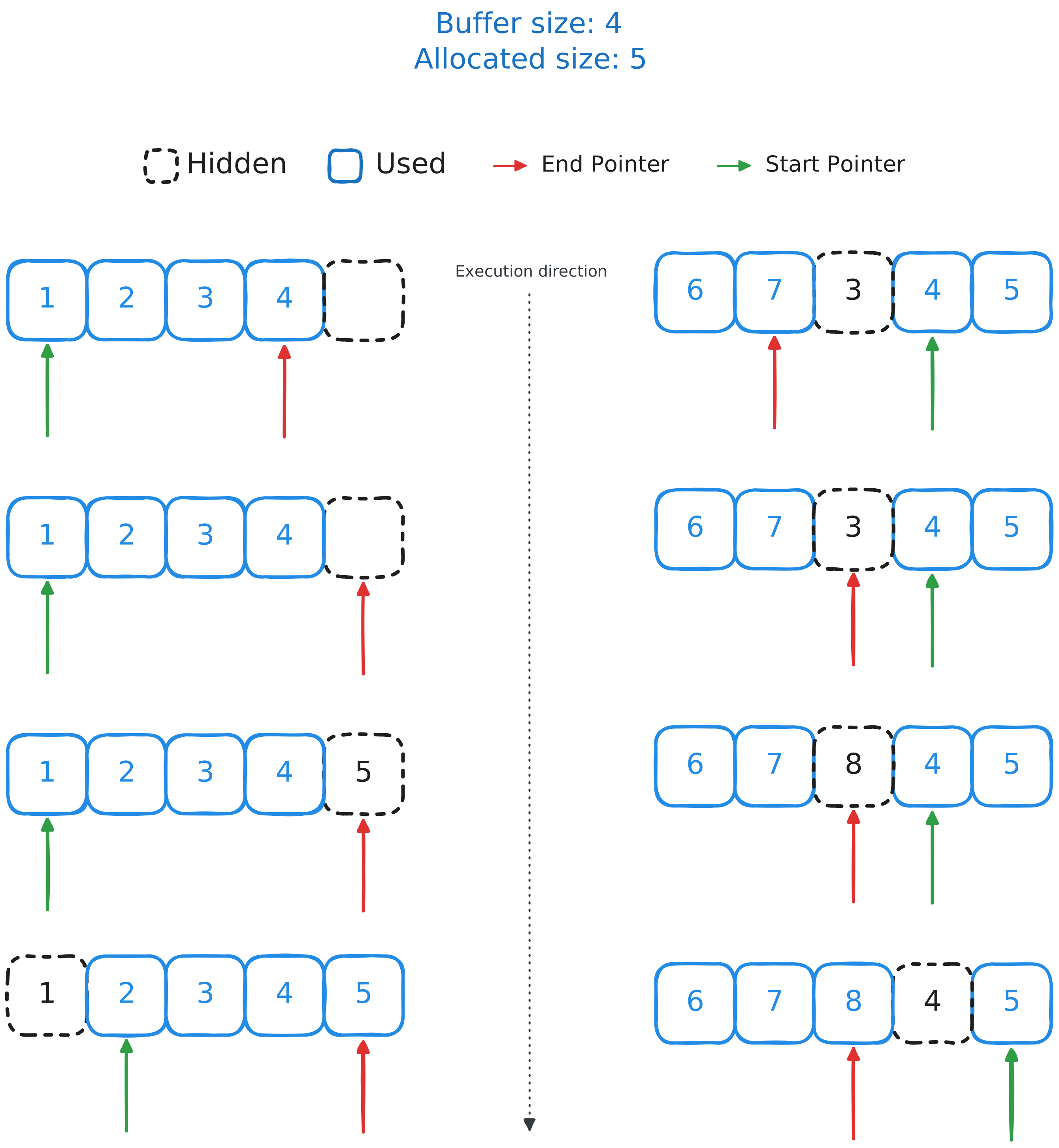
The way the rotating buffer works is by rewriting on itself using two pointers. It use \(n + 1\) memory block, \(n\) for the actual data and another one for the rotating part. When adding an element, it moves by one (looping if needed) the end pointer, writes the new value and then moves by one the start pointer. The block with no pointer pointing on it is the place where it will be written when adding an element.
A custom get function has been made to get data as if it were a normal buffer.
This project is licensed under the GNU Lesser General Public License.
cpp-tic-tac-toe


This is a small, cross-platform project to refresh my memory on how to code in C++ and to set up a project with CMake. It first started as a small personal project, but I decided to make it clean and to do the job to the end.
It's a simple Tic Tac Toe fully in the terminal with a history of each move. The code is separated into modules, one for the matrix, one for the game, and the main which is responsible for the game loop. Each module (except the main) is composed of one cpp file containing the implementation and one hpp with the declaration, with its own library in the CMakeLists.txt.
Matrix
For the matrix, I created a generic class, based on code that I've already written in Python for my school, with 5 attributes. So 3 are private: the matrix data (the list of elements), the array size, and a boolean for checking if it's a square matrix, and 2 public: lines and columns count. Getters should be made instead of putting those public, but it was just a small project and I decided to skip this.
At first the data were stored using a double std::vector because it was easier at first to build on top of it. But after releasing the first stable version, I changed my mind and decided to use malloc instead and to use a simple array instead of a double one. I refactored my whole code to switch from [x][y] to [x * nb_columns + y] for accessing data in the matrix allocated memory.
Display
The game runs fully in the terminal and to accomplish this, I used ANSI Escape Sequences. To be more specific, I primarily used the ones to clear the screen or line, and to display colored text.
But I also used ANSI Esc to create an alternate buffer so the game runs in its own "space" and avoids cluttering or clearing the user's terminal. Creating an alternate buffer is easy: just use ESC[?1049h and voilà, you have opened the alternate buffer. When the game ends, we have to use another escape sequence to quit this buffer, and we do that by using ESC[?1049l. But what happens when using Ctrl ? The program quits but the line that restores the screen is never executed. To counter this, I've written a handler for SIGINT, working for both Linux and Windows using #ifdef and #ifndef to build platform-specific code (also used for enabling UTF-8 in the Windows terminal), to exit the buffer when the program is stopped early.
This project is licensed under the Apache License v2.0.
voxy-backport

This is a backport for MCRcortex's Voxy Minecraft mod. This project is more of a personal one for me and my friends, but I decided to make it public in case someone else might need it. It's not finished yet and it's pretty time-consuming, but with tools like Linkie I gain so much time replacing each of the mappings to Yarn (1.20.1) from Mojang (1.21+).
I'm currently still replacing each piece of code from Mojang mappings to the Yarn ones, and I haven't been able to have a buildable project for the moment.
This project is under MCRcortex licence (Original creator).
MLG


I'm in love with modding and one of my first modding projects was on a Unity game with BepInEx and Harmony. Then, I wanted to have Harmony in my game engine of choice, Godot, to allow people to mod my game with ease since I'm using C# and not GDScript, for which a mod loader already exists. MLG was born after some digging into the way Godot loads C# code and finding where I can inject my own logic.
How it works
The way it works is by hijacking the game's own C# generated DLL to load all my code from there. To accomplish this, I made an installer that copies the game DLL into another file, then it copies over the original with its own custom DLL with the same signature and entry point.
From there, when Godot loads the DLL, I execute my own logic, then load the original game's DLL that we copied earlier into another scope to avoid conflicts with the DLL signature, and finally I call the original code to finish initializing Godot's C# runtime.
For the moment, I can load custom scripts but the project isn't finished yet and needs more features to be usable by anyone.
This project is licensed under the GNU General Public License v3.0.
microbits-cars


In 2025 I've participated in the competition Yes-We-Code with LIAGRE Mathéo where we built a remote-controlled car. We had to use MicroPython for this project and use the Micro:bit card.
My task on this project was to write the module for communication between the controller and the car. To send data we used the radio module of the Micro:bit , so I needed to encode my data so it doesn't take ages to be sent and decoded.
I decided to write a custom packet with a fixed size and encoded in little endian. Each piece of data contained in the packet has a predefined size:
- On State: 1 byte
- Reverse State (inverse motor speed): 1 byte
- Direction: 2 bytes
- Speed: 1 byte
With this I have a packet that is only 5 bytes long and which can be decoded easily. To fit everything, some data like the direction were converted into a smaller range but we lost precision and decided to keep it in the default range, this is why direction is on 2 bytes instead of one, the potentiometer we used outputted 0 to 1024, which is way beyond the 255 limit we have on one byte.
The car decodes by waiting for 5 bytes and reading the data. To ensure correct transmission a default packet is sent at the start, so the buffer is ready for the next instruction.
This project is licensed under the GNU General Public License v3.0.